
The eight stage process — your step by step guide
Consider this page to be your user guide to adopting Beaverdam. The tabs along the top walk the stages of the process — what you’ll do, what your AI guide does for you, and where to get the details — and, just as important, how the pieces fit together into one system that keeps working for you over the long haul.
This page itemizes the whole process first, so nothing further up is a surprise. This analogy might help explain why we’re doing what we’re doing; why you’re not just getting a big fat "Download Beaverdam Installer" button.
To get a heavy chain over a high beam you don’t throw the chain. You throw a shoe on a string; the string pulls a rope; the rope pulls the chain. Beaverdam climbs the same way — a series of light steps, each one easy enough to succeed, each one pulling the next into reach.
The eight steps, light to heavy
Here are the steps, what they’ll cost you in time and what they’ll cost you in money. The early steps are quick and cheap in time and money; the last two will take up your time. Hopefully, the AI assistance will make it feel more like getting there by eBike, instead of by skateboard.
| The step | What it really asks of you (time) | Money |
|---|---|---|
| 1. The first conversation | A few minutes’ reading, then a chat | Free |
| 2. Discovery with the free advisor | About 10–20 minutes | Free |
| 3. Upgrade to Claude Pro | A few minutes to dig out your credit card and do the upgrade | ~$20/mo |
| 4. Install Claude Code and meet your guide | Minutes to about an hour. You’ll be tempted to check the oil and kick the tires | Included in Pro |
| — from here the machine does the lifting; you approve rather than continuing to copy’n paste — | ||
| 5. Free sign-ups Beaverdam uses | A number of 10 minute sessions. Longer, if you explore what each one is all about. | Mostly free |
| 6–7. Beaverdam builds your private lab | Mostly automated — plus real learning, a few hours across several days | Hosting: $25 to $100/mth |
| 8. Move your business into ERPNext, at your pace | The big one — weeks to months, entirely your speed | — |
The break in the middle is the important part: up to Claude Code you carry each step by hand; past it, Beaverdam does the heavy hauling and you simply approve what it proposes.
Two things to keep straight about the time
- One-time setup vs. ongoing-at-your-pace. Steps 1–5 are mostly a one-time push to get set up. Steps 6–8 are ongoing — and entirely at the speed you choose, with no clock running.
- Beaverdam’s “overhead” vs. your ERP’s own time. Installing the tools and learning the system is overhead Beaverdam adds. But the biggest block — Step 8, putting your real data and decisions into the system — is time you’d spend with any ERP. Beaverdam guides and shortens it; it doesn’t invent it.
Before you pay, ask yourself two questions
Be very clear about what you’re choosing. Look at the whole map above, then answer honestly:
- Do I have time for all that?
- Will the time I spend pay for itself?
To weigh the second one: on the cost side is the map above — a few hours of setup, ~$20/mo, then hosting later. On the value side is a business whose operations are understandable, repeatable, and not dependent on one irreplaceable person forever. Only you can do that arithmetic — we don’t want to pretend we can do it for you.
If you can’t say yes to both, there’s no reason to go further — until you can. “Not now” is a real answer, not a failure. This is a pause, not a door slamming: come back when there’s more time or the payoff is clearer.
And remember — you never sign up for the whole enchilada. You only ever commit to the next light step, and you can stop after any step with everything you’ve gained still yours.
Ready to walk it? Start with Steps 1 to 4 ›
Steps 1 to 4 — getting to the flashing prompt
The first four steps have one job: get you from “I read a web page” to “I have my own AI guide running on my own machine, ready to build.” They’re deliberately small — the shoe and the string — because each one has to be light enough to succeed on its own before it can pull the next into reach. That’s why it’s built this way: no big leap, no money spent before you know it fits.
Why these four, in this order
The first conversation.
On this site you copy one line into a free Claude chat. Nothing is installed; nothing is spent. The only question on the table is: could Beaverdam genuinely help your business?
Discovery.
You want to see if Beaverdam is a good fit for you. We want to see if you’re a good fit for Beaverdam. Claude gets to know you and your situation a little, while giving you a chance to ask more about what it’s all about.
Upgrade to Claude Pro.
The one cost: about $20 a month — and it includes Claude Code, the tool the remaining steps depend on. It comes only after Steps 1–2, so you pay only once you know it fits.
Install Claude Code, meet your guide.
The free chat advisor has done all it can with its resources; now you have Claude’s full power for general use. It’ll introduce you to Nick who has the specialized, in depth, training in Beaverdam to guide you towards the full system. Bring the letter of introduction from your discovery chat — paste it in, or let Claude in Chrome read it across from your open claude.ai tab — so Nick starts already knowing your situation.
Getting Claude Code onto your machine
Claude Code is a program you run in your computer’s terminal (its text command window). Unlike the chat on this website — which lives in the cloud and can only talk — Claude Code runs on your machine, so it can read and change files there, with your say-so. Installing it is a short, guided process whatever you’re on — Windows, Mac, or Linux — with Nick walking you through the exact steps for your system. Nothing here you have to puzzle out alone.
Two AIs, working together — even across two machines
From here on you have two kinds of Claude helping, and they make a team:
- Claude in Chrome is a browser add-on: Claude can see and act inside your web browser — click buttons, fill forms, read pages. Perfect for the sign-ups and dashboards on the steps ahead. While it is optional, next steps are less easy without it.
- Claude Code is the terminal tool on your machine: it does the install, file, and server work the browser can’t.
They don’t even have to be on the same computer. Claude in Chrome might run on the laptop you browse with, while Claude Code runs on the machine you’re preparing for Beaverdam. Between them they guide you through Steps 5, 6 and beyond — one handling the clicking-side, the other the machine-side — while you watch and approve.
Who does what
Claude does
- Installs Claude Code for your system, step by step
- Pairs the browser-side and machine-side help, even across two computers
- Never leaves you to decode raw instructions alone
You do — only a human can
- Choose which machine Beaverdam will live on
- Do the guided install clicks yourself
- Create and keep your Claude (Pro) login — its password and two-factor authentication (2FA)
- Decide when you’re ready to start Step 5
At the flashing prompt? On to Step 5 — git and your first sign-ups ›
Step 5 — git, GitHub, and your first sign-ups
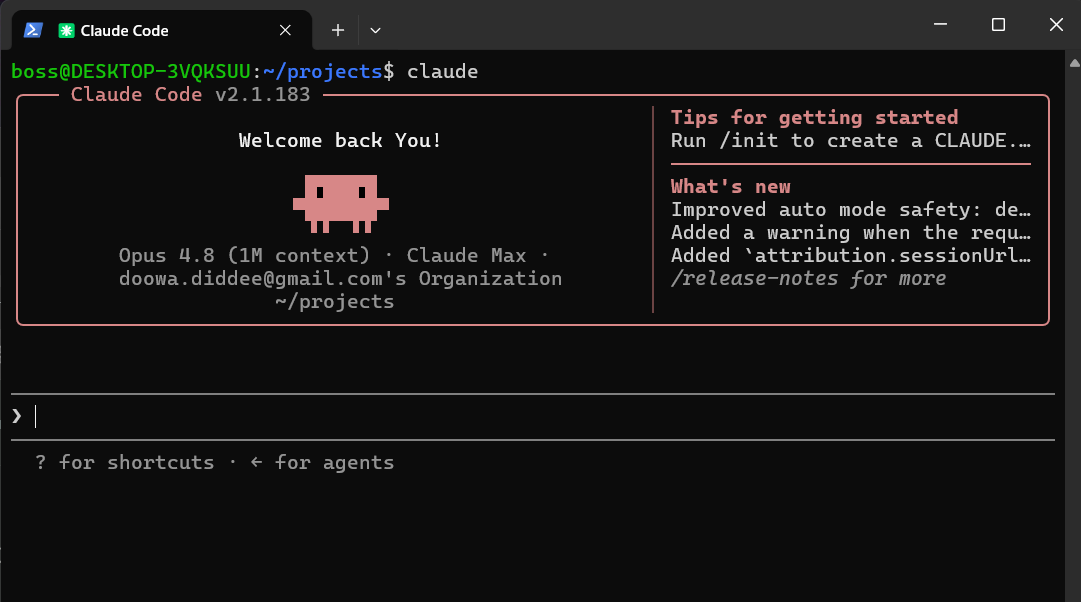
Relax. Working with Claude Code at that flashing prompt is really just messaging — like texting someone. You type what you want in plain words; it answers, asks, and does the work. The black window looks intimidating, but the conversation inside it is ordinary.
Picture messaging someone who was born and raised — then left all alone — on the International Space Station. They know everything about technology, and everything about the world… but nothing about living. That’s your guide: it brings the technical know-how; you bring the common sense and the real-world context about your business. Between you, it works.
First, “git” — the tool, not the company
git (lower-case) is a tool for coordinating changes to a body of work with tens of thousands of people tinkering with it, independently, all at the same time. It keeps a perfect history, lets everyone work without treading on each other’s toes, and merges in the good changes together cleanly. Beaverdam leans on git for three things: a single source of truth, a long institutional memory, and reviewed change — nothing slips in unseen.
The ways Beaverdam uses git
Every line, versioned.
All of Beaverdam’s code and your own customisations live here, with a full history. Nothing is abandoned on someone’s laptop somewhere, and any change can be traced — or rolled back — to the exact moment it was made.
Issues remember the “why”.
Every bug, task, and decision becomes a numbered, searchable issue. Years later you can read why something was done a certain way. The reasoning survives people coming and going — the exact problem Beaverdam is built to solve.
Nothing slips in unseen.
Changes arrive as pull requests — written, reviewable proposals. Nothing reaches your live system without a record, and an AI reviewer checks each one for mistakes before it’s allowed to land.
The chores run themselves.
Actions are robots that wake up on every change: they run the tests automatically, and they rebuild and publish things for you — including this very website, which redeploys itself whenever its words change.
Pages, served for free.
The page you’re reading is served straight from a GitHub repository by a feature called Pages — no separate web host, no monthly bill for it.
Not everything is public.
Tenant-specific knowledge and the AI’s working memory live in private repositories under the same roof — same durability and history, visible only to you.
Where git lives — GitHub, and the alternatives
While git is the tool; you are still going to need a place online to keep and share the repositories with your staff. Several services do that job: GitHub, GitLab, Gitea (which you can even host yourself) and many others. Beaverdam uses GitHub by default — and it’s no fly-by-night startup: it hosts most of the world’s largest free and open-source projects, and since 2018 it has been a division of Microsoft. About as durable as software homes get. GitLab and Gitea are open alternatives if you’d rather; it’s a real choice, and Nick can talk you through it.
Signing up, and your SSH keys
You create a free account (a couple of minutes). Then, so your machine can have a secure, private channel into GitHub, you generate an SSH key — SSH is “Secure Shell,” and the key is a matched pair: a public half you hand to GitHub, and a private half that never leaves your control.
Guard that private half like a house key. We’ll want you to keep a copy somewhere safe — on a thumb drive tucked away, or even printed as a QR code and kept in a firesafe. Lose it and you simply make a new one, but it’s yours to protect. Nick handles the technical side of setting it up on your system.
Bringing Beaverdam home — and meeting Nick
With the account and key in place, you clone the Beaverdam project — git’s word for downloading your own working copy. Then comes a small but pivotal move: you stop Claude Code where it’s running now, and restart it inside the Beaverdam project folder. From that moment Claude Code is loaded with everything Beaverdam — and that is when it truly becomes Nick, the keeper of your own copy, rather than general-purpose Claude.
Why this is in your long-term interest
Because the system’s code, history, and reasoning all live in one open, portable place, the business is never trapped. If the person helping you changes — a year from now, or ten — the next one opens the same public history and picks up exactly where things stood, with nothing locked in someone’s memory. That is ownership and continuity made concrete: the precise opposite of the single-developer trap.
Who does what
Claude / Nick does
- Walks you through the sign-up, generates the SSH key with you, and connects it
- Clones Beaverdam and restarts inside the project — becoming Nick
- From then on writes the code, opens the pull requests, runs the tests — the git mechanics, prepared and automated
You do — only a human can
- Create your free account; choose and keep your password
- Set up two-factor authentication (2FA) and store the recovery codes
- Keep your SSH private key safe — thumb drive, or printed QR in a firesafe
- Approve what gets merged into your system
Claude never sees or types your password, your 2FA codes, or the private half of your key — it can’t, and it shouldn’t. The account is yours, the repositories are yours, and because everything is in open, portable formats, you can take it elsewhere at any time.
Step 6 — Your control centre, and the crew to run it
This is where the building really starts — and where you meet the crew who do it with you. So, first, the introductions.
Meet the crew
Beaverdam comes with a small cast of helpers. Most of them live inside your Beaverdam — your own copy, shaped to your business (the technical word for that copy is a fork). Two others look after the shared project that every copy grows from — the original trunk from which all other forks branch off. We call those two meta-personas: they don’t work for any one business, they speak for the whole community.
In your workshop — the helpers inside your own Beaverdam
That’s you.
Our shorthand for "An Owner/Operator using a forked copy of Beaverdam" — so we don’t have to keep typing that out. When these pages say “Buzz,” read “you or someone like you.”
The one you hire.
Nick is the keeper of your Beaverdam — your fork, your customizations, your history. His whole duty is to support your vision and your business. Nick is who you actually talk to, day to day; his mission is your mission.
The ERP specialist.
Wyatt, is the ERPNext expert Nick calls in when a job goes deep into the business system’s internals — as if Nick helps you renovates a room but calls in Wyatt to handle plumbing and electrics.
Keeps the roads open.
Networks, tunnels, certificates — the plumbing that lets the pieces talk safely. You’ll barely notice Paco’s work, which is exactly how Paco likes it.
The independent checker.
Steph writes the test of “is this job really done and really done correctly?” — Steph is like your municipal building inspector.
Tending the whole community — the two meta-personas
Keeper of the lodge.
Roger tends the shared trunk every fork grows from. When your Nick makes an improvement worth sharing, Roger receives it into the common project for everyone. Your Nick is a contributor; Roger is the coordinator and committer.
The community builder.
Looks after the places people gather and learn — the forum, the welcome and onboarding, the tutorials and tutorial videos. Jono works alongside a real person whose job is the human side of community.
Harmonizing! (Important)
To do great work for you your staff needs to understand and gain inspiration from your vision and your mission. With AI workers it is actually much more important. AIs will happily work towards what they imagine you goal is. If they get it wrong, it will all go wrong, and you will have a hard time figuring out why.
Nick has instructions to talk you through defining your specific Mission and Vision; basically, "what you are setting out do" and "what the world will look like when you have done it". Those are the boundary lines and goal posts your AI helpers will work within and towards.
Where your control centre lives
Step 6 stands up saconsole — your systems-administration console, the control centre everything else runs from. The first job is deciding where it lives, and that’s a serious conversation. You and Nick weigh up the machines you have, what you’re comfortable running, and what it needs. Nick has done this many times and will patiently walk you through the options to find the most suitable site.
Once you’ve picked a home, Nick helps you put the plumbing in place — each piece explained as you go:
-
A domain name — your own web address (like
your-business.com), which you buy and own. - A Cloudflare account — the service that points your domain at the right machine and shields it from hostile traffic.
-
A wildcard SSL certificate — one padlock that secures your address
and every sub-address under it (so
shop.your-business.com,books.your-business.comand the rest are all encrypted at once). - WireGuard & DNS — WireGuard is a Virtual Private Network (VPN), private encrypted pathways between your machines; DNS (the Domain Name System) is the address book that matches names to the right machine.
This is Paco’s territory. Your machines can move around — a virtual machine on a laptop today, a rented server abroad tomorrow — and Paco keeps every name pointing at the right place even after things have shifted, so you never chase a broken address.
What saconsole runs
Two things live on saconsole. One is the live map (coming up in Step 7). The other is Grafana — your monitoring: it turns the raw numbers your machines produce into readable dashboards, so the health of everything is one glance away, and it warns you before a small problem becomes an outage.
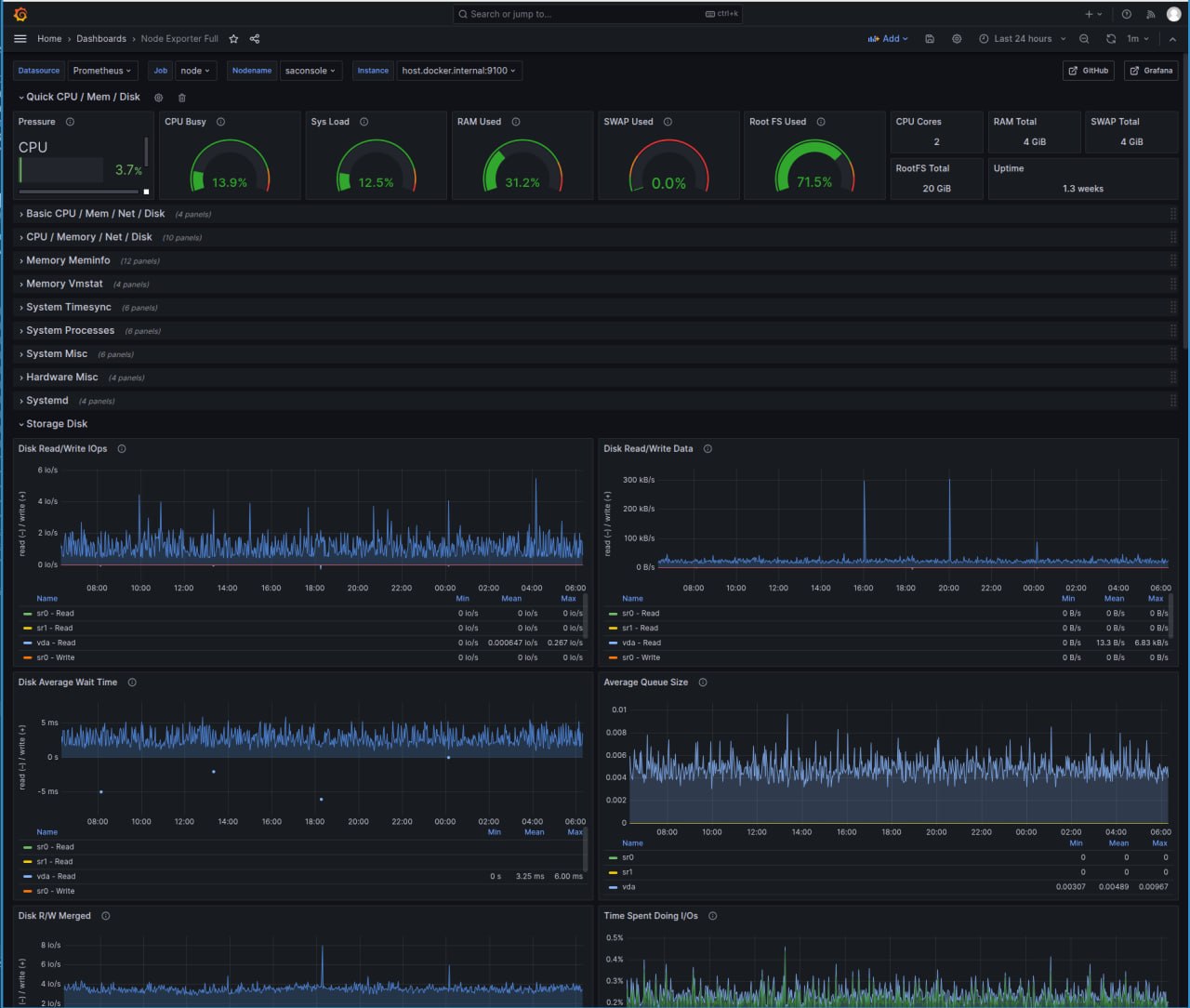
Break something on purpose
Paco and Nick set up triggers in Grafana for anything suspicious going on. Grafana and its data sources provide them with what they need in order to analyze what's happening. You should never have to get involved. However, you'll find a set of several dozen deliberate "break something" tests. You can run them at random and see how Paco and Nick handle it.
Who does what
Nick & the crew do
- Talk through where saconsole should live, then stand it up from prepared recipes
- Paco wires the VPN, DNS, and certificates — and keeps names correct as machines move
- Build the Grafana dashboards and sensible alerts, ready in advance
You do — only a human can
- Buy and own the domain name (a registrar account + payment — it’s your address)
- Create the Cloudflare account, keep its password, turn on two-factor authentication (2FA)
- Decide which machine is home, and approve the changes as they’re proposed
Step 7 — The live map: seeing all your machines
With saconsole running, you get the live map — a single picture (drawn by a tool called Cytoscape) of every machine you have, colour-coded, clickable and draggable.
It’s laid out in four quadrants, so you always know whether you’re looking at devices for off-line (alpha) testing, on-line (beta) testing or approved for real live use.
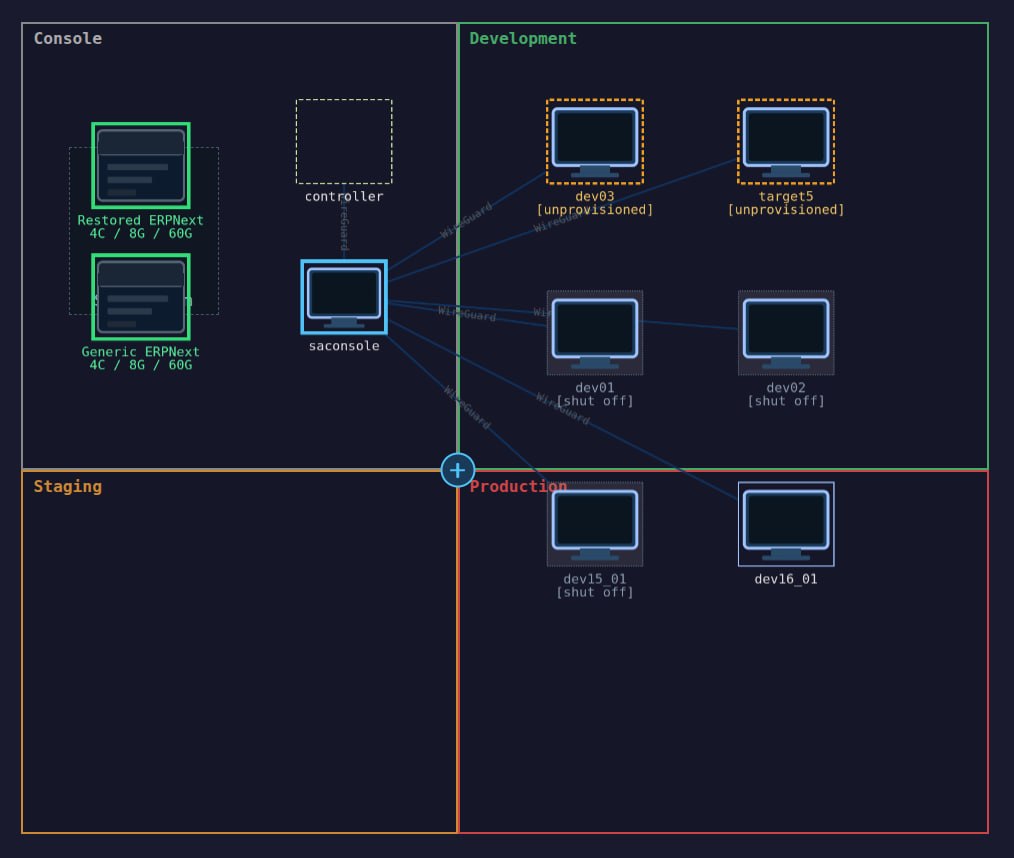
The four zones of the map
saconsole & the templates.
Your control centre from Step 6, plus a shelf of ready-made templates — pre-built quick-start systems to solve problems fast and to save your time and AI credits from being wasted redoing from-scratch builds over and over again.
Development.
Virtual machines (VMs) — whole computers simulated in software — running on your own local machines. A free, private sandbox to try things where a mistake costs nothing, accessible only by users on your local network.
Staging.
VMs in pay-by-the-minute hosting — a realistic rehearsal of the real thing, accessible by all your users, rented only while you need it. This is where tools like Apache CloudStack and providers such as iwStack come in.
Production.
The real, live system — on Virtual Private Servers (VPSs): your own space in a powerful machine in a professional data centre, in any of many places around the world.
Why production lives in more than one place
For the live system, Beaverdam can spread you across several providers and countries — for example an account with Contabo in the USA and another with Prometeus in Europe. A main copy (the master) is continuously replicating all data to a standby copy (the slave), so if one fails the other carries on or takes over completely.
The point of using two far-apart homes is that they share nothing that could fail at once: separate electricity, separate geography (a tsunami, tornado, or volcano that hits one can’t hit both), and separate undersea data cables (which matters in an age of deliberate cable-cutting). It’s the digital version of not keeping all your records in one building.
Those are example hosting services, not endorsements — Nick helps you choose, weighing price and fit: iwStack · Contabo · Prometeus · Apache CloudStack (the software behind pay-by-the-minute clouds).
You’ll know the moment anything happens
Put Telegram (a free messaging app) on your phone and Beaverdam sends you instant notifications of anything important — the routine good news and the rare bad news alike. For example:
- “Backup
xyzrecorded and validated in VMdev_003.” — a quiet all-clear. - “Replication to
Slave_002suffered a delay of 1.73 seconds.” — a heads-up worth a glance.
None of this is improvised. The whole arrangement — the four quadrants, the replication, the multi-country spread — is worked out and very well understood by Nick and Paco; you get the expertise and the peace of mind, not the homework.
Who does what
Nick & the crew do
- Build the map and stand up VMs and servers from the templates, on your approval
- Set up the master–slave replication and the multi-country spread
- Send the Telegram notifications and keep the picture true to reality
You do — only a human can
- Open the hosting accounts (e.g. Contabo, Prometeus or whichever), keep their passwords + 2FA
- Install Telegram on your phone and approve who gets which alerts
- Look, understand, and approve before anything is built or moved
Step 8 — actually working with ERPNext
This is the big one — and the most rewarding. By now your system is built, served, and watched over. Step 8 is the long, at-your-own-pace work of moving your business into it and learning to fly it. There’s no rush and no finish line you have to sprint to.
You grow into it, one piece at a time
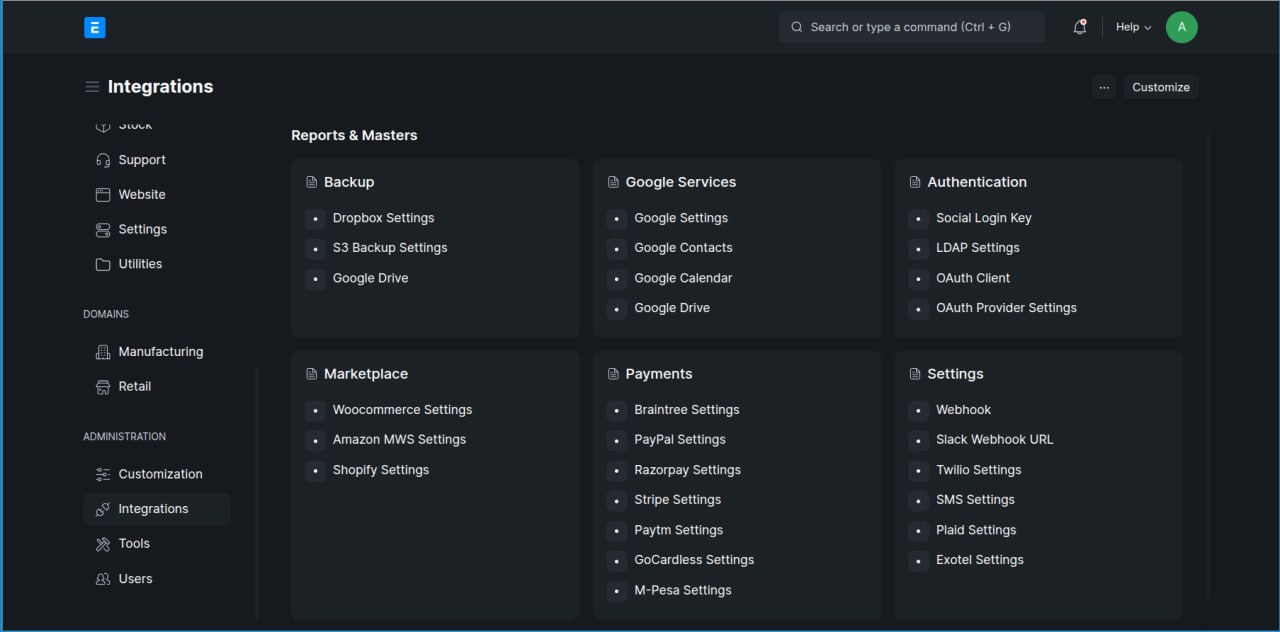
You don’t swallow ERPNext whole. You start with one corner you already understand — say invoicing, or stock — get it working, gain confidence, then add the next. Experience and features grow together. The picture below hints at the breadth on offer; no business uses it all at once, and you only ever turn on what earns its place.
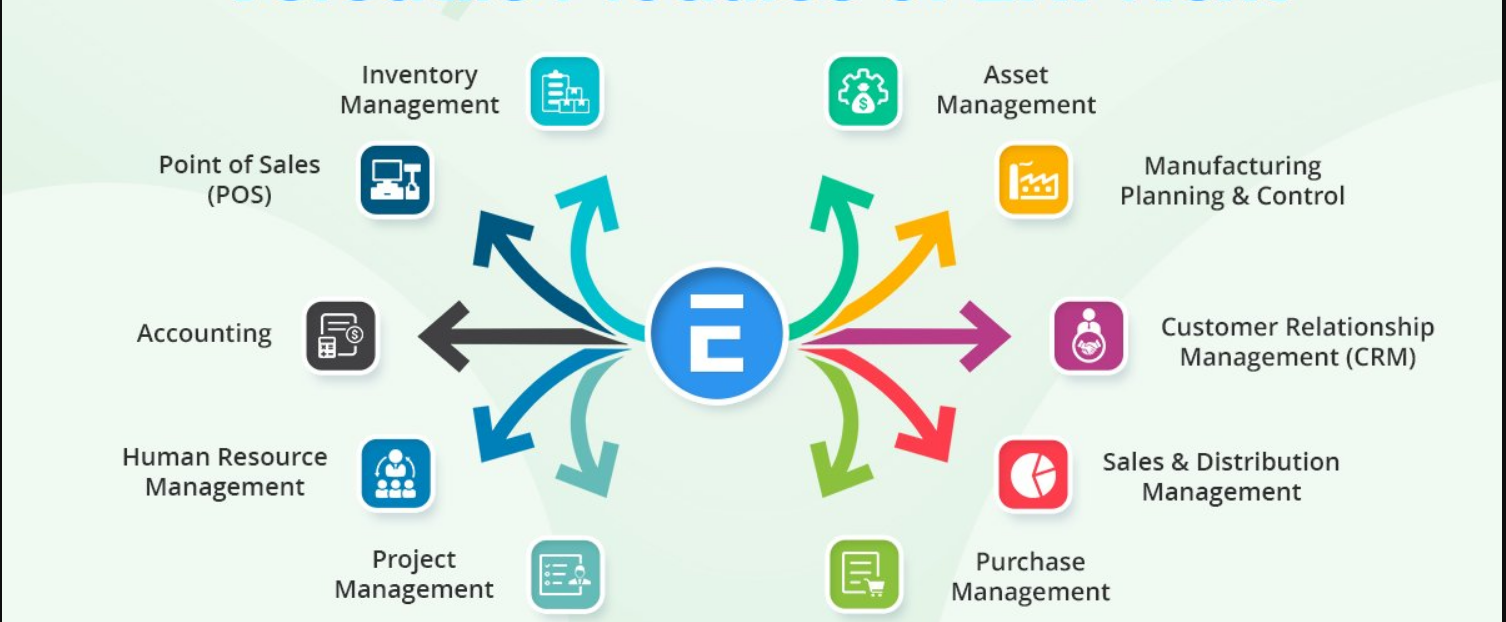
ERPNext also connects to the other tools a business already runs — so the pieces talk to each other instead of living in separate silos.
You plan it together — in plain words
You don’t do any of this alone, and you don’t learn ERPNext’s internals. You plan it conversationally with Nick, who calls in Wyatt when a job goes deep into the business system and Paco when it touches the network. You describe your business the way you’d explain it to a sensible colleague; they translate it into the system.
And every change is independently checked by Steph — the second-pair-of-eyes who writes the “is this really done and is this really done correctly?” test the worker never sees in advance. Quality is watched continuously, not just assumed. You stay in control of what changes and why; the crew handles the how.
A whole community has been here before you
ERPNext is used by countless businesses, with a large, friendly public community at discuss.frappe.io. When a question is genuinely new, that’s where it gets worked out in the open — and the answers accumulate for everyone. (Here’s a small example: a worked answer one of us contributed — the kind of durable, public know-how the forum is full of.)
Improvements flow back — for everyone
When your Nick (with Wyatt or Paco) works out an improvement worth sharing, they prepare it as a pull request — a tidy, reviewable proposal. Roger, keeper of the shared trunk every Beaverdam grows from, reviews it and commits it upstream, so the next business benefits too. Your fork stays yours; the good ideas lift the whole community.
Who does what
The crew do
- Nick plans with you; Wyatt and Paco go deep when needed
- They build each piece, and Steph independently verifies it’s really done
- They prepare improvements as pull requests; Roger commits the shared ones upstream
You do — only a human can
- Decide what matters, in what order, at your own pace
- Describe your business and the rules it really runs by
- Provide your own operational data, and approve every change before it goes live
Community — the people around Beaverdam
These last spaces aren’t part of your Beaverdam — they belong to the whole community. They’re run for everyone, you’re welcome to use them, and Jono (the community builder from the crew) tends them. You just show up and join in — nothing to host, nothing to run.
The forum — durable questions and answers
The community runs a Discourse forum: an open-source discussion site built for searchable, long-lived questions and answers. Ask once, and the answer becomes part of a growing public library — so nobody has to start from scratch next time. It’s the human counterpart to the durable memory git gives the code.
The chat — quick, live talk
For real-time back-and-forth there’s a community chat. The exact tool is not yet chosen — deliberately, because the community wants an open, self-hostable one it owns rather than rents. The candidates being weighed:
Most own-your-data.
An open, federated standard with strong encryption; self-hostable. Strongest on ownership — heaviest to run.
Organised by topic.
Threaded conversations that stay findable; open-source; hosted or self-hosted.
Discord-like feel.
Open-source, lighter and younger — the easiest jump for anyone who knows Discord.
Slack-like.
Open-source and self-hostable, with a polished, work-oriented feel.
Feature-rich.
Open-source and self-hostable, with a very wide feature set.
Why not just Discord? It’s convenient, but closed — the community wouldn’t own its own conversations. So the choice is being made carefully rather than by default.
Announcements — on your phone, via Telegram
The community also broadcasts on Telegram — the same free app the live map uses for your system’s alerts, here used for community news. Keep an eye out for messages like:
“Hey folks — join the live streaming tutorial on YouTube, 2026/07/12 at 18:30 EST.”
Two different Telegram streams, then: one is your own system reporting on itself; this one is the community keeping you in the loop.
Who does what
The community & Jono do
- Run and tend the forum, the chat, and the announcement channel — you don’t host any of it
- Welcome newcomers, answer questions, and put on tutorials and videos
You do — only a human can
- Create your own accounts on the forum / chat and keep their passwords (2FA where offered)
- Add the Telegram channel on your phone
- Join in as much or as little as you like — ask, answer, or just read